A live 3D brain
Each step lights up the part of the brain that does that kind of work: reading files lights the visual area, running commands the motor area, planning the front. Turn it, zoom it, or let it follow the action.

IntegruX Brain is a free Mac app that shows, live, what your AI coding agent is doing and what it remembers. Each step it takes lights up a part of a 3D brain, and its memory, plans and skills sit together on one board. It works with Claude Code.
The download comes from the app’s GitHub release page: IntegruXHQ/brain.
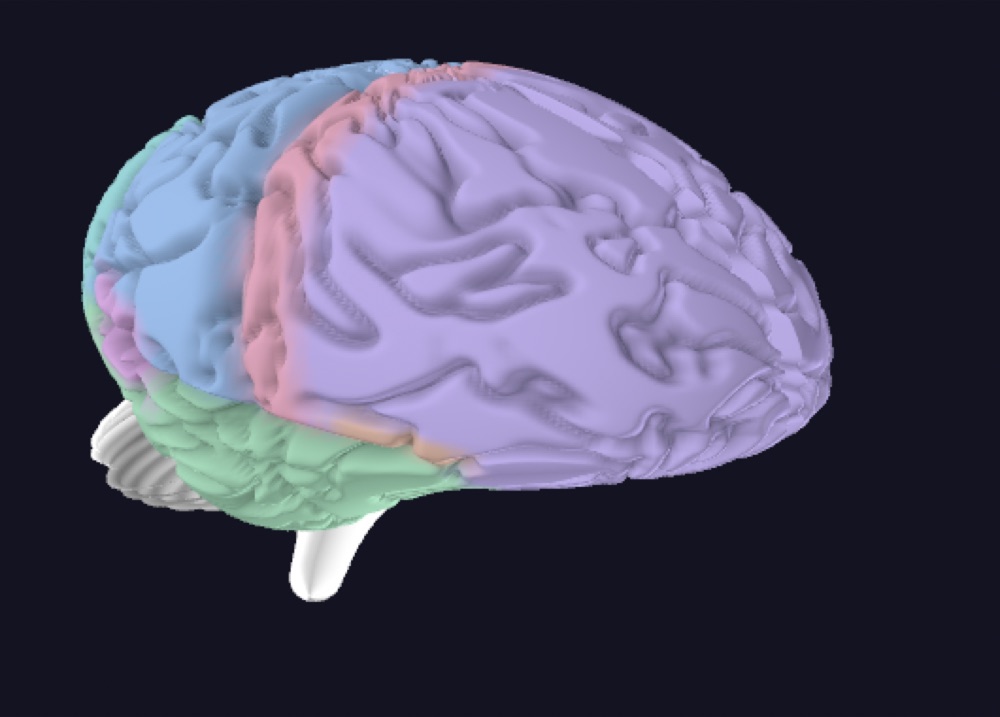
Recorded live from the app: the Hologram look with X-ray on. Each step lights up its region and the deep structures inside, sparks run from one memory to the next along the synapses, and when the agent works fast the whole brain lights up.
Your agent works in a terminal and you see only its text. Brain shows the rest: where it’s looking, what it’s doing and what it has learned about you and your projects.
Each step lights up the part of the brain that does that kind of work: reading files lights the visual area, running commands the motor area, planning the front. Turn it, zoom it, or let it follow the action.
A small window that stays on top and shows the file or web page the agent has open right now, so you can read along. Secret files such as keys, passwords and credentials are never shown.
Every memory file your agent keeps, its rules, plans and priority board, in one place you can browse. The board shows what’s happening right now, today’s work and where the effort goes.
When the same job comes up twice, or fails twice, Brain writes a skill for it: the fastest path that worked and what went wrong before. Your agent uses it next time. It all happens on your Mac.
Brain files each kind of memory and each kind of step under the brain area that does the same work in a person. Click any part in the app to see what it holds. X-ray shows the parts inside.
Your priority board and plans. Lights up when the agent plans or tracks tasks.
Running commands, editing code, building and installing.
Reference notes about where things live. Lights up when it looks around for files.
Reading files, searching code and viewing screenshots.
Project memories: what each project is and where it stands. Also web research.
Feedback memories: how you want it to work and lessons from your corrections. Skills light it up too.
The rules that load into every session. Lights up when a session starts.
Every time a memory is saved or updated.
Security notes, secret scans and security reviews.
Pick how the brain is drawn, and whether the app follows day, night or a quiet gray. New installs start on Classic with X-ray on.
Coloured lobes. The easiest way to see which part is which.
A dark glass brain whose nerve fibres glow, with light running to the active part.
Pink-grey tissue with wet folds, like a medical model.
A cloud of glowing points with contour lines and a slow scan.
You need Claude Code installed and signed in with your own account. Brain never signs in for you.
Brain never calls Claude, never sees your Claude login and never sends anything anywhere. It has no account and no analytics.
?query parts removedKept in ~/Library/Application Support/IntegruX Brain, readable only by you.
No. Brain makes no calls to Claude at all. It reads the small log the hook writes and the memory files already on your Mac. Skills are written by the app itself, on your Mac.
Connect adds one hook to ~/.claude/settings.json and saves a backup first. Brain also runs a small background job once an hour, at low priority, to learn skills. Each learned skill has its own on/off switch on the Skills card.
Choose IntegruX Brain › Uninstall…. It takes the hook out and puts your settings back exactly as they were, turns off the background job, and deletes the activity log and the app’s data. Then drag the app to the Trash.
No. Like every IntegruX app, it’s built only for Apple silicon (M-series) Macs, on macOS 15 or later.
Version 1.0 doesn’t update itself yet. New versions appear on the GitHub releases page; on GitHub you can choose Watch › Releases to be told.
Not for now. The app is free and the GitHub page holds the download and its notes. It’s signed with our Developer ID and notarized by Apple.
In Terminal, run this in the folder with the download. It should print the line below.
shasum -a 256 IntegruX-Brain-1.0.dmg
84fc1f3716170fc0fd8a62693a6f8f1757bcdac3c71afdc1b0e7367b2e235d05  IntegruX-Brain-1.0.dmg
Claude Code is a product of Anthropic. IntegruX Brain works with it but isn’t made, endorsed or supported by Anthropic.